- Published on
- Exercise 3
Blocking vulnerable workloads from OpenShift
- Authors
- Name
So far we've looked at analysing CVEs that are exposed on OpenShift. We've looked at how to identify vulnerable container images, and how to create campaigns and generate data for specific high-interest CVEs.
But how did those CVEs get there in the first place? What if we could identify CVEs before they become running code on the platform?
Red Hat Advanced Cluster Security for Kubernetes (RHACS) supports a couple of ways of identifying / managing CVEs before they make it to OpenShift:
Integrating CVE scanning into CI/CD pipelines. Red Hat Advanced Cluster Security for Kubernetes (RHACS) supports the
roxctlCLI, a portable binary that can be used to inject CVE scanning into any pipeline or development process.Admission control Red Hat Advanced Cluster Security for Kubernetes (RHACS) pushes down a Kubernetes admission controller to secured OpenShift clusters. This means we can make decisions about allowing / blocking vulnerable workloads before they are accepted to the cluster.
What is Kubernetes admission control?
An admission controller is a piece of code that intercepts requests to the Kubernetes API server prior to persistence of the object, but after the request is authenticated and authorized.
Admission controllers limit requests to create, delete, modify objects. Admission controllers can also block custom verbs, such as a request connect to a Pod via an API server proxy. Admission controllers do not (and cannot) block requests to read (get, watch or list) objects.
Red Hat Advanced Cluster Security for Kubernetes (RHACS) deploys a Kubernetes admission controller to secured clusters that can be used to validate applications for vulnerabilities or misconfiguration before being deployed to the cluster.
Using the RHACS admission controller
Let's take a closer look at the Red Hat Advanced Cluster Security for Kubernetes (RHACS) admission controller. In the previous exercise we created a policy for PwnKit, which we used to report on vulnerable workloads.

We're going to re-use this same policy to now block vulnerable container images from OpenShift. To get started, navigate to Platform Configuration -> Policy Management. Perform a search for pwnkit, and find the policy for your user.

Select 'Edit policy' from the 'kebab' menu on the right.

There's no changes we need to make to the policy details, so let's click 'Next' on the first screen.

We are going to make some changes to the 'Policy behavior' section. Change the 'Response method' from 'Inform' to 'Inform and enforce', and ensure that the toggle for 'Deploy' is switched to 'Enforce on Deploy'.

This means that our policy will now block any workloads vulnerable to PwnKit, whenever we try to create a new deployment or update an existing deployment. Great!
Click next to continue to the policy criteria. There's no other changes we need to make here, so just click 'Next'.

We're going to add an inclusive scope for this policy, so that it only targets each users' namespace. Next to 'Restrict by scope' click the Add inclusion scope button.

Select openshift from the 'Cluster' drop-down, and enter your workshop username for the 'Namespace'. The inclusive scope should look like this:

Select 'Next' and review the policy. You should check that the 'Policy behaviour' is set to 'Deploy' for Enforcement, and that there is an inclusive policy scope defined.

When you're happy, click 'Save'.
Trying out the new policy
Let's try out the new policy for PwnKit and make sure that blocks vulnerable container images.
Login to OpenShift and navigate to your individual project. Select the + in the top-right corner of OpenShift to create a new deployment.

Copy the following YAML into the Import YAML field and click Create.
apiVersion : apps/v1
kind: Deployment
metadata:
  name: backend
  namespace: %%replace-me%%
  labels:
    app: backend
    app.kubernetes.io/component: backend
    app.kubernetes.io/instance: backend
    app.kubernetes.io/name: backend
    app.kubernetes.io/part-of: backend
spec:
  replicas: 1
  selector:
    matchLabels:
      app: backend
  template:
    metadata:
      labels:
        app: backend
    spec:
      serviceAccountName: default
      serviceAccount: default
      containers:
      - name: backend
        image: quay.io/the-worst-containers/pwnkit:v0.6
        securityContext:
          capabilities:
            add:
             - ALL
        command: ["sleep", "infinity"]
If everything works you'll see an error presented, showing that your deployment was blocked because it is vulnerable to PwnKit.
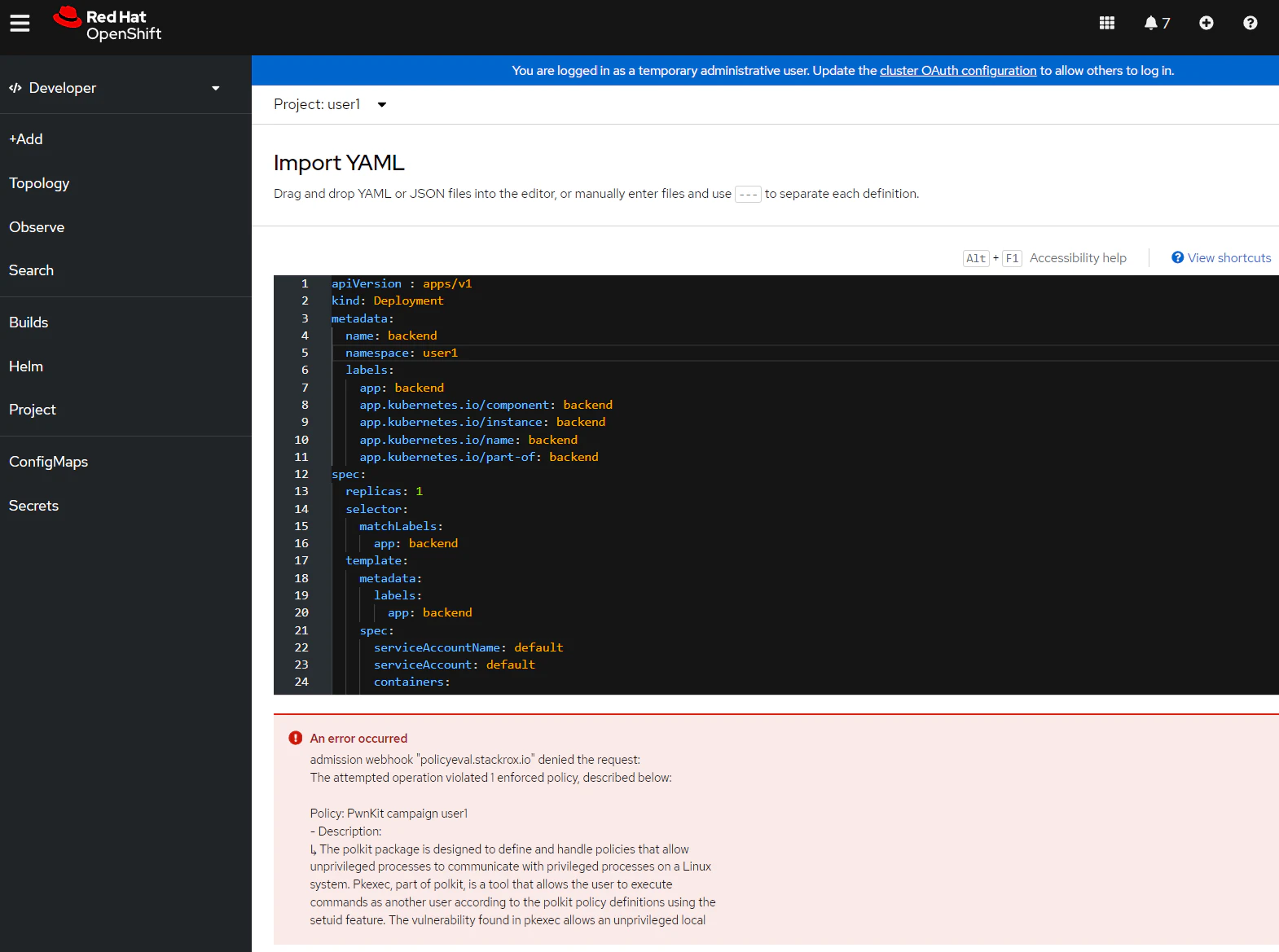
Inspecting admission control violations
Red Hat Advanced Cluster Security for Kubernetes (RHACS) records policy violations, and can optionally send these to an external platform, like Splunk or Microsoft Sentinel.
Navigate to RHACS, and select 'Violations'. You should be able to see a new violation for the PwnKit campaign username policy.

Digging into this policy violation shows the reason it was triggered. In this case, CVE-2021-4034 was discovered in a vulnerably policykit-1 package in the container backend.

The violation also captures any enforcement activity. Here you can see that Red Hat Advanced Cluster Security for Kubernetes (RHACS) failed the 'deployment create' as the container image was vulnerable to PwnKit.

Finally, you can see the policy that triggered this policy violation. In our case, it's the PwnKit campaign username policy.

Summary
In this lab we looked at blocking vulnerable applications from OpenShift, using the Red Hat Advanced Cluster Security for Kubernetes (RHACS) admission controller. In this exercise we used an existing policy created to report on PwnKit-vulnerable workloads, and changed the policy behaviour to block these at deployment-time.
Troubleshooting
You may see an error "admission plugin ValidatingAdmissionWebhook failed to complete validation in 13s for field undefined"
If this happens, just click 'Create' again.
You may also see the message "Error parsing YAML: YAMLException: bad indentation of a mapping entry at line 5, column 14: namespace: %%replace-me%%"
Make sure that you replace the namespace field with your username.